

If you’ve ever felt confused or overwhelmed by web accessibility, you’re not alone. Between the technical jargon, the legal concerns, and the sheer number of guidelines out there, it’s easy to feel like accessibility is something only specialists can tackle.
But here’s the thing – accessibility isn’t as complicated as it seems. Let’s break down what it actually means, why it matters, and how you can start making real improvements without needing to become an expert first.
What Web Accessibility Actually Means
At its core, web accessibility is about removing barriers so people can perceive, understand, navigate, and interact with your content – regardless of how they access the web.
Not everyone uses a website the same way you do. Some people navigate entirely with a keyboard because they can’t use a mouse. Others use screen readers – software that reads page content aloud – because they’re blind or have low vision. Some people rely on captions because they’re deaf or hard of hearing. Others need extra time to read or prefer simplified layouts because of cognitive differences.
And it’s not just people with permanent disabilities. Think about someone with a broken arm trying to navigate one-handed, or a parent holding a baby while checking their phone, or anyone trying to watch a video in a noisy coffee shop without headphones.
Accessibility means building sites that work for all of these people – not as an afterthought, but as a natural part of how the site functions.
Why It Matters
Accessibility isn’t a niche concern. It’s a core part of building a usable web experience.
- It’s about real people accomplishing real goals. Every day, people use websites to apply for jobs, schedule medical appointments, buy groceries, take classes, and connect with their communities. When those sites have accessibility barriers, real people get locked out of real opportunities.
- It makes your site better for everyone. Accessible sites tend to be clearer, faster, and easier to use across the board. Good heading structure helps screen reader users, but it also helps sighted users scan content quickly. Captions help deaf users, but they also help anyone watching video without sound.
- It reduces legal risk. Accessibility-related lawsuits have been climbing steadily – over 4,000 cases were filed in 2024 alone. Proactively addressing accessibility helps protect your organization (and your clients) from legal exposure.
- It supports SEO. Many accessibility best practices – like descriptive alt text, clear heading structure, and semantic HTML – also help search engines understand and rank your content.
What Web Accessibility Is Not
Misunderstandings about accessibility are common, and they tend to make the work feel harder than it needs to be. So let’s clear a few things up.
- It’s not just a checklist. You’ve probably heard of WCAG – the Web Content Accessibility Guidelines. These are the internationally recognized standards for web accessibility, organized into three conformance levels: A, AA, and AAA. WCAG is genuinely useful, but accessibility isn’t about checking every box and calling it done. Real accessibility is an ongoing practice, not a one-time stamp of approval.
- It’s not only for big or regulated organizations. Accessibility benefits every site – from a local bakery’s homepage to an enterprise platform. You don’t need a legal mandate to care about whether your users can actually use your site.
- It’s not about reaching perfection. You don’t have to fix every issue overnight to make meaningful progress. Small improvements add up. A site that’s 80% accessible is far better than one that’s 20% accessible – and both are better than doing nothing.
- It’s not just about visual design. Colors and fonts matter, but accessibility goes much deeper. It’s about how your site works – whether forms are labeled correctly, whether users can navigate with a keyboard, whether your content makes sense when read aloud by assistive technology.
Accessibility Is an Ongoing Process
Here’s something that trips up a lot of teams: accessibility isn’t finished when you launch a website.
Your site changes over time. Content gets added. Plugins update. New pages go live. Each of those changes can introduce new accessibility issues. For most teams, maintaining accessibility is a lot like ongoing quality assurance – it requires regular testing, fixes, and attention.
That’s why the most effective approach isn’t a one-time audit followed by radio silence. It’s building accessibility into your regular workflow – checking new content as it’s created, running periodic scans, and fixing issues before they pile up.
Where to Start
If you’re new to accessibility, here are a few places to begin:
- Run a scan on your homepage. Automated tools can catch a lot of common issues – missing alt text, low color contrast, form labels that aren’t connected to their inputs. It won’t catch everything, but it gives you a starting point.
- Try navigating your site with just a keyboard. Put your mouse aside and use only the Tab key to move through your page. Can you tell where you are? Can you reach all the interactive elements? Can you activate buttons and links? This simple test reveals a lot.
- Check your headings. Screen reader users often navigate by jumping between headings. If your headings skip levels (jumping from H1 to H4, for example) or don’t accurately describe the content that follows, navigation becomes confusing.
- Add alt text to images. If an image conveys information, describe it. If it’s purely decorative, mark it as such so screen readers skip over it. This is one of the highest-impact changes you can make.
These aren’t exhaustive, but they’re real actions you can take today.
How Tools Like AAArdvark Help
Accessibility tools play a big role in helping teams find and fix issues – but not all tools work the same way.
AAArdvark is built specifically for web agencies and developers managing multiple client sites. It combines automated scanning with manual testing workflows, so you can catch both the obvious issues and the ones that require human judgment.
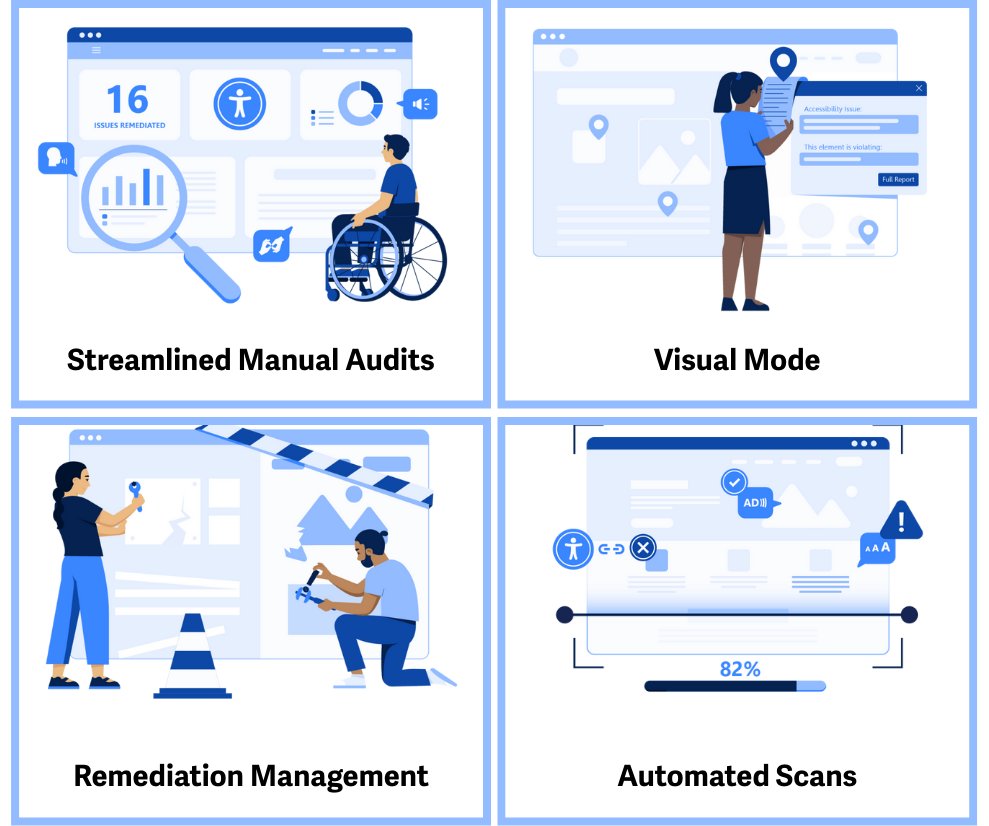
One of its standout features is Visual Mode, which overlays accessibility issues directly on the live page. Instead of sifting through a spreadsheet of cryptic error codes, you can see exactly where each issue is and what element it affects. Every issue comes with plain-language guidance on what’s wrong and how to fix it – so you’re not left guessing.
The platform also supports team collaboration. You can assign issues to specific team members, leave comments, track progress, and verify fixes – all in one place. For agencies juggling multiple client sites, this makes it much easier to stay organized and keep projects moving.
And because accessibility is ongoing, AAArdvark includes scheduled monitoring. You can set up regular scans to catch new issues as content changes, so problems don’t pile up between audits.
Accessibility Is Just Good Web Design
When your site is accessible, more people can use it successfully. Interactions become clearer and faster. Your team spends less time firefighting and more time building. And you reduce the risk of legal issues down the road.
Accessibility isn’t about adding special accommodations for a small group of users. It’s about building digital experiences that work for everyone – including the people you might not have thought about yet.
You don’t need to have all the answers today. You just need to start.
Ready to See Where You Stand?
Start with a free homepage scan and see what accessibility issues might be hiding on your site. No credit card required – just real insights you can act on.
AAArdvark can help!
AAArdvark goes beyond automated testing to provide the tools you need to identify, track, and fix accessibility issues that impact real users. Take accessibility beyond compliance.
Try AAArdvark for free today and start making real improvements that matter.
No credit card required.
